
Organizations
The shared account that holds members, roles, billing, security, and audit records.
An organization is the shared account in NeoIQ. It holds members, roles, access groups, billing, security settings, integrations, and audit records. Every brand engagement runs inside one organization.
The product areas are where work happens: Strategy Studio, Content Engine, Creative Lab, Intel Desk, Brand Guard, Open Canvas. The organization is the operating boundary around that work.
Rule of thumb. If the setting controls who can enter, what they can do, what is billed, or what is recorded, it belongs to the organization.
What an organization owns
| Area | What it controls |
|---|---|
| Members | People with access. Includes pending invitations and member roles. |
| Roles | Built-in and custom roles, plus the per-role permission matrix. |
| Access groups | Reusable permission sets attached to a group of members. |
| Billing | Active plan, seats, subscription state, payment method, invoices, overage settings. |
| Usage | AI quota, request counts, model breakdowns, exports, BYOK status. |
| Security | SSO providers, SCIM provisioning, session preferences, authorized OAuth apps, connected apps. |
| Integrations | API keys, MCP servers, AI provider credentials, workflow connections, allow lists. |
| Activity | Audit log of organization events, plus the recent-activity stream. |
| Notifications | Notification channels (email, in-app, browser) for organization, security, and system updates. |
| Profile | Organization name, logo, slug, description, website, business type. |
What an organization is not
The organization is not a work surface. It does not draft briefs, render assets, or run reviews. Use the named product areas for the actual work:
| Work | Use this name |
|---|---|
| Briefs, positioning, messaging | Strategy Studio |
| Multi-channel copy | Content Engine |
| Visual drafts and iteration grids | Creative Lab |
| Competitive feeds and digests | Intel Desk |
| Compliance review and verdicts | Brand Guard |
| Freeform work and advanced flows | Open Canvas |
If the sentence is about where work gets done, name the product area. If the sentence is about access, billing, or audit, name the organization.
One organization or several
Most operators start with one organization. Enterprise accounts often run several when access, billing, or audit must stay separated.
Use one organization when:
- One brand or operating company is in scope.
- Billing flows through a single contract.
- Members are mostly the same across brands.
Use several organizations when:
- Brands sit under different legal entities or contracts.
- Markets must keep audit records apart (KSA, UAE, EGY).
- An agency relationship needs a hard wall between client work.
- Procurement requires separate invoices.
Switch between organizations from the organization switcher in the top-left of the navigation. The current organization is shown in the workspace identity at all times.
The organization lifecycle
| Stage | What happens |
|---|---|
| Create | The first owner creates the organization. The name and slug are set. The first invitation can go out. |
| Invite | Owners and admins invite members by email or magic link. Roles are assigned per invitation. |
| Run | Members work inside the product areas. Brand Guard records every approval. The audit log captures events. |
| Review | Owners review members, roles, integrations, and billing on a schedule. Stale access is removed. |
| Wind-down | If the organization closes, owners delete it from the danger zone. Audit records and billing complete. |
Every step above is governed by a setting somewhere in this section. The pages below cover them.
The settings layout
Settings has two groups. The split matches the data they own.
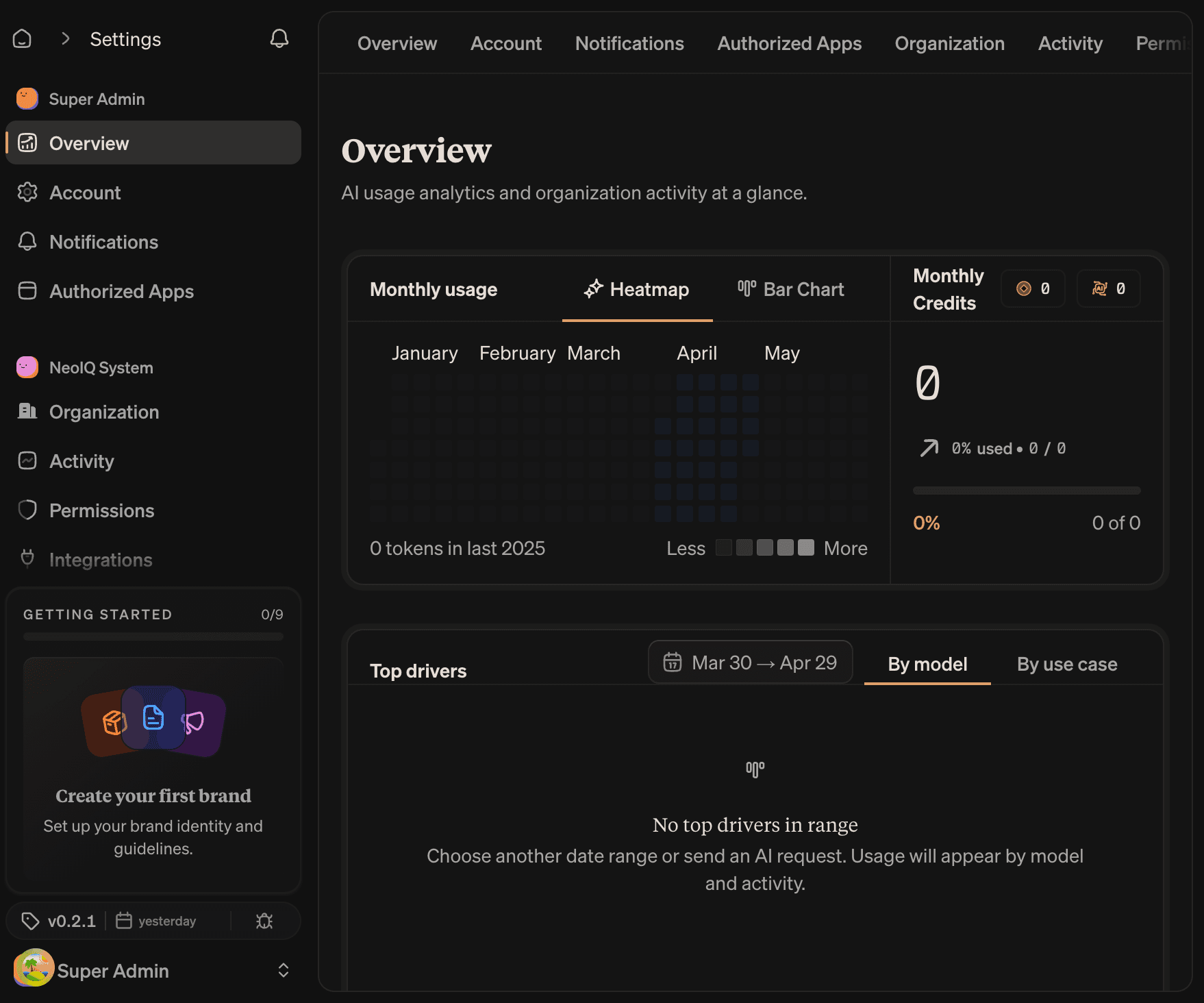
| Group | What it controls |
|---|---|
| User settings | The signed-in operator only. Profile, notifications, authorized apps. Does not change other members. |
| Organization settings | The shared organization. Members, billing, security, integrations, audit. Affects everyone. |
The user-settings sidebar item shows the operator's avatar. The organization-settings sidebar item shows the organization logo. The split is intentional — every change to organization settings is visible to other members.
User settings
| Page | What it controls |
|---|---|
| Overview | A snapshot of organization activity and AI usage. Read-only. |
| Account | Profile, password, two-factor authentication, connected accounts, preferences. |
| Notifications | Personal notification channels, sounds, browser alerts. |
| Authorized Apps | Third-party OAuth apps with access to your account. |
Organization settings
| Page | What it controls |
|---|---|
| Organization | Profile, members, invitations, roles, access groups, organization deletion. |
| Activity | Audit log of organization events, in stream or table view. |
| Permissions | Per-role permission matrix. Organization-specific overrides on top of defaults. |
| Integrations | AI providers, workflow integrations, database connections, MCP servers. |
| SSO | SAML and OIDC identity providers, domain verification, SCIM provisioning when enabled. |
| API Keys | Programmatic access tokens with scoped permissions and expiration. |
| Usage Details | AI usage by token, request, model, and use case. With CSV export. |
| Billing | Active plan, seats, subscription state, usage limits, overage, invoices, upcoming charges. |
Who manages what
Roles map to capabilities. The default split is:
| Capability | Owner | Admin | Member | Viewer |
|---|---|---|---|---|
| Edit organization profile | ✓ | ✓ | ||
| Invite and remove members | ✓ | ✓ | ||
| Manage roles and permissions | ✓ | |||
| Manage billing and seats | ✓ | |||
| Configure SSO and SCIM | ✓ | |||
| Create and revoke API keys | ✓ | ✓ | ||
| Add and remove integrations | ✓ | ✓ | ||
| View activity (audit log) | ✓ | ✓ | ||
| Delete the organization | ✓ |
Custom roles can adjust the matrix per organization. Permissions in the next page describe how.
Common scenarios
| Scenario | Where to start |
|---|---|
| Add a new operator | Members and roles |
| Move billing to a new contact | Billing and usage |
| Connect an identity provider | Security and integrations |
| Investigate who changed a setting | Settings · Activity |
| Hand off ownership before leaving | Members and roles · Transfer ownership |
| Delete an organization that is closing | Settings · Danger zone |
Read next
- Members and roles. Invitations, built-in and custom roles, access groups, ownership transfer.
- Settings. Organization profile, notifications, activity, permissions, danger zone.
- Billing and usage. Plan, seats, AI usage, overage, exports.
- Security and integrations. 2FA, SSO, API keys, MCP, integrations, authorized apps.